

Frequently Asked Questions
Table of Contents
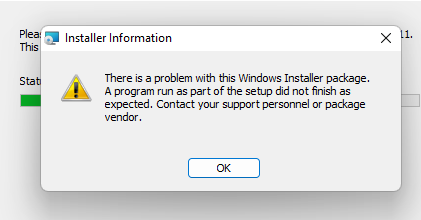
- msi install fails
- Screen sharing stops working on macOS after OS upgrade
- Mocha tn5250/tn3270/telnet for windows 10 and print margins
- iOS 13 and Bluetooth Mouse
- Chrome Apps in the future
- TN5250/TN3270 TLS session to server works on older Windows 7 version, but fails with Windows 10 and 7 with latest updates
- TN5250 screen looks as garbage
- Mocha tn5250/tn3270 for Windows 10 and many users on one PC ?
- Octal values in Mocha Telnet
- How do I receive the invoice?
- Can mocha tn5250/tn3270 for windows 7/8/10 use different colors for sessions
- No Internet access can cause slow .NET program load on Windows?

- If I purchase XXX for my Android device at Google Play, will I be able to install the same app again?
- If I purchase XXX for my Iphone, will I be able to install the same app on my itouch or ipad?
- How to type keys missing from a PC keyboard
- Is it safe to download .exe files
- Can a license key for mocha w32 tn5250/tn3270 be used with the Windows 7/10/11 products
- Mocha Activex ... and Google toolbar v 4, gives F12 problem
- Mocha TN5250 for Mac OS X makes a crash if you delete font Times.dfont
- How to delete a configuration for Mocha TN5250/TN3270/TN3812 for Mac OS X
- Upgrade to IIS 6.0 (Microsoft Web Server), gives missing keyboard/EBCDIC files
- Function keys don't work in the Mocha TN5250 for Mac OS X application
- The AS/400 drops connection to TN5250
- Field separator value in Mocha W32 TN5250. .... or space
- Numlock Del key sends a . or ,
- Can I install new fonts for the Mocha Terminal Emulators
- Write screen to a file
- Is there a mailing list for MochaSoft products
- What is your TIN Number
- Can I fax my credit card information to MochaSoft
- Can I contact MochaSoft via phone
Can mocha tn5250/tn3270 for windows 7/8/10 use different colors for sessions
There is only one set of colors in the programs configuration file user.config
The configuration is as default stored in a file user.config at the users private folders.
After installation, use menu - tools - configuration to import/export the users configuration file.
You can run tn5250.exe or tn3270.exe with the configuration file as a parameter. See the help system for possible parameters.
Using different user.config files, will allow you to have different colors
Example
/Y c:\myfolderssomewhere\user.config1
/Y c:\myfolderssomewhere\user.config2
Mocha tn5250/tn3270 for Windows 10 and many users on one PC ?
The configuration (and license key) is as default stored in a file user.config at the users private folders.
For a user "jan" it is at
C:\Users\jan\AppData\Local\MochaSoft\tn5250.exe_StrongName_r5rg5brdlcmcb0dukofkrllxhfa0nm1k\3.5.0.0\user.config
(the exact folder path may be different, it is .NET in the OS selecting the long folder name.)
After installation, use tn5250:menu - tools - configuration to import/export the users configuration file.
You can run tn5250.exe with the configuration file as a parameter. See the help system for possible parameters
You can install the configuration file with the MSI package
tn5250.msi CONFIG=c:\user.config
This will only install the user.config file in the current users folders, therefore do not run the installation as a system administrator
After installation (only company license), a license key is also stored in registry
HKEY_LOCAL_MACHINE\SOFTWARE\Mochasoft\tn5250w7
as to handle the situation if another user on the PC start tn5250. In some environments, the user may not have access to this registry. It require some rights to change the data. If you use windows 8/10, it does not allow a normal user to write to the registry at this position. You must start tn5250.exe as administrator, write the license key to menu - tools - license, and exit.
If you cannot write to this registry, a solution could be to make a shortcut on the PC desktop to tn5250.exe, and include an user.config file as a parameter.
iOS 13 and Bluetooth Mouse
iPad OS v 13.4 now includes full support for a Bluetooth Mouse. Just pair it in settings Bluetooth.
For older versions, see the setup guide.
Mocha tn5250/tn3270/telnet for windows 10 and print margins
Older versions had a calculation bug for the left/top print margins. The June 2020 versions now uses the correct inch value.
Change the margin value using menu - tools - options - printer. A good start value is 0.
Screen sharing stops working on macOS after OS upgrade
At macOS System Preferences - sharing , select "screen sharing off" and "remote management on". Make a reboot, and turn "screen sharing on again". Sometimes the VNC server in macOS can get into a strange state.
msi install fails
It could be a damaged configuration file giving the problem. For a user "jan" it is at
C:\Users\jan\AppData\Local\MochaSoft\tn5250.exe_StrongName_r5rg5brdlcmcb0dukofkrllxhfa0nm1k\3.6.0.0\user.config
The exact folder path may be different, it is .NET in the OS selecting the long folder name. Above is for TN5250, if the product is TN3270 or TELNET, replace tn5250.exe.
Try to remove folder
C:\Users\jan\AppData\Local\MochaSoft\tn5250.exe_StrongName_r5rg5brdlcmcb0dukofkrllxhfa0nm1k
manually. It will in most cases be with a hidden attribute.
It can also be a problem with .NET installed in the Windows OS , making TN5250 stop from running. At the end of the installation, the MSI package start tn5250.exe
Mocha tn5250/tn3270/telnet for windows 10 and print margins
Older versions had a calculation bug for the left/top print margins. The June 2020 versions now uses the correct inch value.
Change the margin value using menu - tools - options - printer. A good start value is 0.
Can a license key for mocha w32 tn5250/tn3270 be used with the Windows 7/10/11 products
A license for mocha w32 tn5250/tn3270 or Telnet can not be used with our new Windows 7/10/11 products.
Mocha Activex ... and Google toolbar v 4/5, gives F12 or F3 problem
The new Google toolbar version 4.0 uses F12 as a hot key, and the activex object will never get the key event. Either use Google toolbar version 3, remove the Google toolbar, or assign F12 function to another key in our product, as a work around solution.
In Google tool bar v 5, F3 is taken for a find function.
Mocha TN5250 for Mac OS X makes a crash if you delete font Times.dfont
If the font used in our Dialog/menu is deleted or replaced with a bogus font, our tn5250 program will make a crash.
The font must not be removed from /System/Library/Fonts/Times.dfont
How to delete the configuration for Mocha TNxxxx for Mac OS X
To delete the configuration file (tn5250/tn3270/tn3812/telnet installed from this site), it is recommended from the terminal to run command
defaults delete dk.mochasoft.tn5250
defaults delete dk.mochasoft.tn3270
defaults delete dk.mochasoft.tn3812
defaults delete group.dk.mochasoft.mochatelnet
To delete the configuration file for the lite version from App Store, run
defaults delete dk.mochasoft.tn5250applite
defaults delete dk.mochasoft.tn3270applite
defaults delete RR9F5EPNVW.group.dk.mochasoft.mochatelnet
To delete the configuration file for the paid version from App Store, run
defaults delete dk.mochasoft.tn5250app
defaults delete dk.mochasoft.tn3270app
defaults delete RR9F5EPNVW.group.dk.mochasoft.mochatelnet
TN5250/TN3270 TLS session to server works on older Windows 7 version, but fails with Windows 10 and 7 with latest updates
TN5250/TN3270 uses the SSL/TLS layer in the Windows OS. If your server is configured to use a SSL/TLS cipher the Windows 7/10 OS does not include, it will fail.
Microsoft patch KB3175024 for Windows 7 removes less secure Ciphers.
Client certificates are not supported in our products.
If using a self signed certificate on the AS/400/Mainframe with key length 512 and/or certificate is not using MD5 , the Windows 10 OS may reject the request.
Microsoft has a list of Ciphers supported on different platforms.
Chrome Apps in the future
New products for Chromebook using Android have been released and will replace Chrome OS Apps. Read more
On 11 August 2020 Google released this message to developers:
Hello Chrome App Developer,
As we previously announced in 2016, and again in January 2020, Chrome Apps will be shut down. We are writing to let you know about modifications to the plan, along with some important updates about ending Chrome Apps support.
Review the following schedule for details. Please note, the timelines are for Chrome Apps only, and do not impact Chrome Extensions.
Scheduled Date Action March 2020
- Chrome Web Store stopped accepting new public Chrome Apps. Developers will be able to update existing Chrome Apps through June 2022.
- Enterprise administrators may continue to submit new private and unlisted Chrome Apps to the Chrome Web Store.
June 2021
- General support for Chrome Apps on Windows, Mac, and Linux will end June 2021. Organizations will be able to use a policy setting to extend support on Windows, Mac, and Linux through June 2022.
- General support for Chrome Apps on Chrome OS will remain enabled, without requiring any policy setting, through June 2022.
June 2022
- Chrome Web Store will stop accepting new and updated private and unlisted Chrome Apps.
- End support for Chrome Apps, NaCl, PNaCl, and PPAPI for all platforms.
More details on the Chromium Blog on January 15, 2020
On 12 December 2017 Google released this message to developers:
Chrome Apps are currently scheduled to stop working on Windows, Mac and Linux in Q1 2018, as Chrome continues to focus on moving the open web forward.
The Chrome team is now working to enable Progressive Web Apps (PWAs) to be installed on the desktop. Once this functionality ships (roughly targeting mid-2018), users will be able to install web apps to the desktop and launch them via icons and shortcuts; similar to the way that Chrome Apps can be installed today.
In order to enable a more seamless transition from Chrome Apps to the web, Chrome will not fully remove support for Chrome Apps on Windows, Mac or Linux until after Desktop PWA installability becomes available in 2018. Timelines are still rough, but this will be a number of months later than the originally planned deprecation timeline of "early 2018".
We also recognize that Desktop PWAs will not replace all Chrome App capabilities. We have been investigating ways to simplify the transition for developers that depend on exclusive Chrome App APIs, and will continue to focus on this - in particular the Sockets, HID and Serial APIs.
To be clear, the overall trajectory of the Chrome Apps platform is not changing. Support will still be fully removed on Windows, Mac and Linux in the relatively near term, therefore we don't see Chrome Apps as a viable long-term solution for new or existing projects.
Additionally, Chrome Apps will still be de-listed from the Web Store before the end of 2017 as originally planned. At this time, all Chrome App listings will be hidden from Web Store search and browse functions on Windows, Mac, and Linux. Support for inline installation will also be removed.*
At a later date, we'll provide another more specific update on new timelines for the full removal of Chrome Apps support on Windows, Mac and Linux.
------------------------------------
On 10 October 2016 Google released this message to developers:
We are reaching out to you because you are registered as a Chrome App developer in the Chrome Web Store. As you might have seen recently, we announced that we will be increasing our focus on the Web and open standards by removing support for Chrome packaged apps and hosted apps on Windows, Mac, and Linux over the next two years. Chrome apps will remain supported and maintained on Chrome OS for the foreseeable future. Chrome extensions will also continue to be supported on all platforms.
Starting in late 2016, newly published Chrome apps will only be available to users on Chrome OS.
Existing Chrome apps will remain accessible on all platforms, and you can continue to update them.
In the second half of 2017, the Chrome Web Store will no longer show Chrome apps on Windows, Mac, and Linux,
but will continue to surface extensions and themes. In early 2018, users on these platforms will no longer be able to load Chrome apps.
The mochasoft products for Chrome are apps, not extensions. Apps vs Extensions
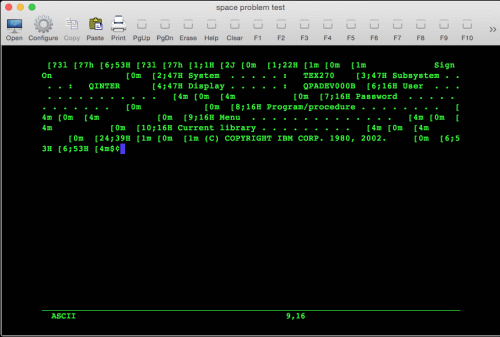
TN5250 screen looks as garbage
If the TN5250 screen looks as:
- The device name field for the configuration is not valid, such as has space characters. Make sure the field is 100% empty or has a valid device name.
- User press the keyboard at session start, and interrupt the terminal negotiation.
- The AS/400 rejects the terminal type. 24x80 or 27x132, try the other
Upgrade to IIS 6.0 (Microsoft Web Server), gives missing keyboard/EBCDIC files
Microsoft has made a strange change in the Web server, which will stop the server from downloading files of unknown types. We must see this as a bug, and can notice Microsoft has released this page:
IIS 6.0 Does Not Serve Unknown MIME Types
Function keys don't work in the Mocha TN5250 for Mac OS X application (Mac OS X)
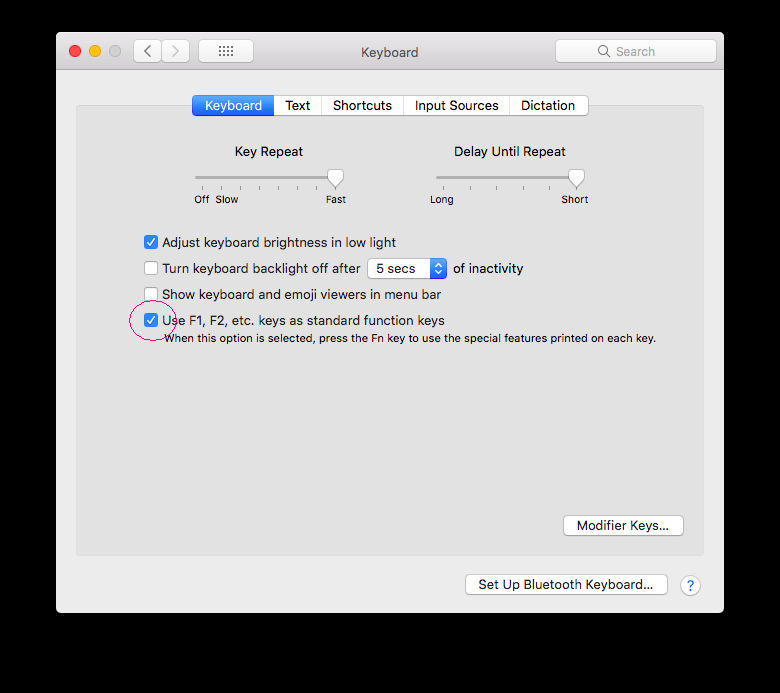
In Mac OS X 10.13.x - macOS 11.x select use f1,f2... as standard keys in System Preferences - keyboard
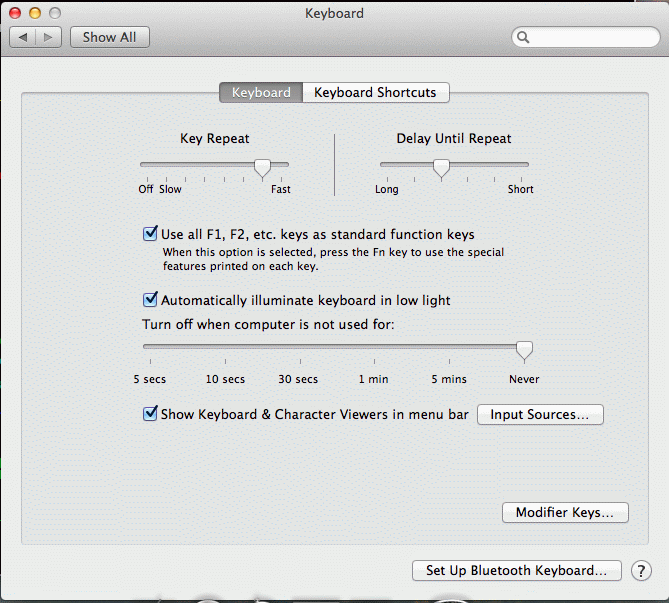
In Mac OS X 10.7.x - 10.11.x select use f1,f2... as standard keys in System Preferences - keyboard
In Mac OS X 10.6.x , make sure Exposé has not reserved the keys for use. Select System preferences - Exposé and select '-' or a key combination not used with TN5250. See screen example below:
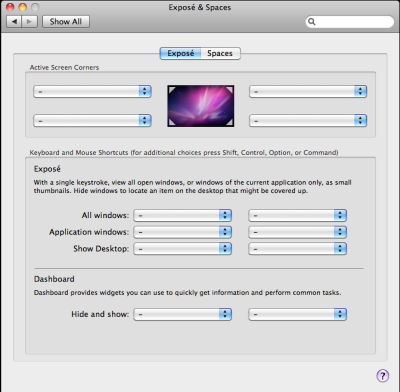
In Mac OS X v.10.3, the F9, F10, and F11 function keys are reserved for use by Exposé, a feature that tiles open windows and reveals files on the desktop. Therefore, these function keys don't work as expected in other applications.
Reassign the keyboard shortcuts in the Exposé System Preferences (Select Apple menu icon - system preferences - personal - exposé) so that the F9, F10 and F11 keys will work as intended in other applications.We can recommend in the Apple menu icon - system preferences - (hardware section) "keyboard and mouse" -
section: keyboard
off [] use F1 - F12 for custom actions
section: keyboard shortcuts
on [x] turn on full keyboard access
Apple has changed the keyboard and mouse dialog, and in 10.4, you should enable
on [x] Use all F1 , F2, Etc keys as standard function keys.
If Exposé is used, it is possible to use double keys to get 5250 functions. As an example to issue a F9 function on the 5250 screen, press either fn + f9 or ctrl + f9
The AS/400 drops connection to TN5250
The Mochasoft products includes no timeout function. It must be a network or AS/400 problem. We have received reports on 2 issues on the AS/400.
If is is a network problem , in some cases it will help to enable the keep alive function in our MochaSoft product.
- - On AS/400 OS V4R4M0 there is an IBM PTF MF23060, which could solve the problem.
- - Disabled the Keep Alive function at the AS400 end.
Field separator value in Mocha W32 TN5250
Before Version 6.0, blank fields with the Field Separator option enabled would be shown as ......
As many customers could not accept this, the Field Separator value was in version 6.0 changed from a dot to a space. It is possible to define the field Separator value in mocha w32 tn5250:
a) In mocha w32 tn5250, Select menu - settings - EBCDIC translation. A dialog box is shown.
b) in the left box click on "separator" (second element from the top)
c) upper right box shows the current value. (0x20 is space).
d) in lower right box select (2 * click it) a new value. Maybe 0xb7
e) verify upper right box shows the new value
f) select save to file
TN5250 with SSL gives ONLINE-SSL but no session after some time
The AS/400 often will not release the connection on a particular TCP/IP port when ended (especially abnormally when a user clicks the (X) box instead of signing off). Run netstat *CNN, and check if all the SSL ports are full.
Issue commandNETSTAT *CNN
and end all the affected ports. Maybe check with IBM for a PTF
Left ctrl key does not work
The TN5250 emulator uses as default ctrl c and ctrl v as copy/paste. If left ctrl must be used as RESET, select menu - edit and click off "ctrl+c and ctrl+v"
Question: Numlock Del key sends a . or ,
It looks as national keyboards have printed either a . or a , on the Del key. Also the scan codes have been seen in different variations around the world. In the Mochasoft product, it is possible to select menu - settings - keyboard layout, which contain a check box:
Numlock Del key swap between . and ,
Can I install new fonts for the Mocha Terminal Emulators
The terminal emulators will only use fonts included with the windows Operative System. It is possible to install extra fonts. We can recommend:
or try a free font called Anonymous at Mark Simonson Studio
Notice a terminal emulator can only use non proportional fonts (same width for all characters).
Write screen to a file
To save a screen copy to a file, either use the clipboard or , you must install a Generic Text Only printer and then redirect the screen to this printer:
a) In the Windows OS, Click Start, point to Settings, click Printers, double-click Add Printer Wizard, and then follow the steps to install a local "Generic/Text Only" printer.
b) In the mocha terminal emulator, click the print icon, select the Generic printer, and select option - Print to file
Is there a mailing list for MochaSoft products
No, not at the moment
What is your TIN Number
MochaSoft is a Danish company and pay Tax in Denmark, and should not have a US Taxpayer Identification Number (TIN). Please do not send us yet another W-9/W-8 forms. We could keep a cow alive with these forms for the next year.
Our Danish VAT # is DK25442113
Can I fax my credit card information to MochaSoft
Mochasoft can only receive credit card orders via 2checkout. See our buy section for details.
Can I contact MochaSoft via phone
As to keep cost (and interrupts) to a minimum, we cannot supply technical support via phone or fax.
Can we receive a paper invoice before sending a check
Yes, - see section Order with a purchase order
How do I receive the invoice?
All the invoices for 2checkout orders are generated as PDF documents. The invoice can be downloaded by logging in to 2checkout myAccount in the Order History section.
If you are ordering on behalf of a company, the invoice will be sent automatically to the billing email address provided during ordering.
When you access 2checkout myAccount for the first time, go to "Forgot your password?" link and enter your email address that you have used to order.
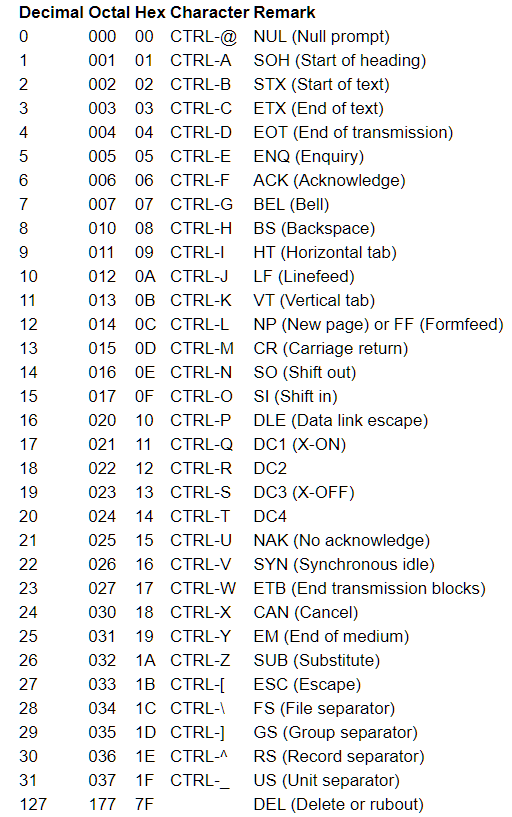
Octal values in Mocha Telnet
Mocha telnet uses octal values in the configuration for none printing characters.
If I purchase XXX for my Android device at Google Play, will I be able to install the same app again?
Your application purchases are tied to your Google Account and can be installed an unlimited amount of times on any device. So, for example, if you remove 'My Favorite Game' to save memory, you can reinstall it at a later date with no charge by simply visiting My Apps. Note: free applications are not saved to My Apps after you remove them. See also Google play - how to
A company cannot buy one single user license, and install it on many devices. See Google Play Terms of Service. Section 4 Restrictions:use Content as part of any service for sharing, lending or multi-person use, or for the purpose of any other institution, except as specifically permitted and only in the exact manner provided. attempt to, or assist, authorize or encourage others to circumvent, disable or defeat any of the security features or components that protect, obfuscate or otherwise restrict access to any Content or Google Play.
If using a new device, and the App does not show as free to download again, sometimes it can help to clear the cache.
Also make sure to use the same Google Play account, as your purchase is linked to your account.
- Open your Android device's Settings app and then tap Apps
- Find the Google Play Store app and tap it.
- Tap the word Storage and then hit CLEAR CACHE. If this does not help, try CLEAR DATA
If I purchase XXX for my Iphone, will I be able to install the same app on my itouch or ipad?
Apple allows you to authorize up to 5 computers in one household to use purchased content. Example: you can buy one tn5250 license and install tn5250 on both your iPad and iPhone. Usage rules (2) at ITUNES STORE TERMS AND CONDITIONS
A company cannot buy one single user license, and install it on many devices.
Apple also have a Volume Purchase Program for business and Managed Apple IDs for business. Please contact Apple for advice about these options.
No Internet access can cause slow .NET program load on Windows?
Some .NET programs might load slowly on computers that are not connected to the Internet.
This occurs with programs that are digitally signed. (Microsoft recommends that all programs be digitally signed.) The .NET Framework attempts to verify the digital signature. One of the operations it performs is to see if the digital certificate has been revoked. If the computer cannot access the Internet, a 30 second to 1 minute delay may be encountered.
To work around this issue on a per-machine basis, Microsoft recommends disabling CRL checking by changing a setting in Internet Explorer. Use the following steps to disable the CRL checking in Internet Explorer:
- Select Start » Control Panel.
- Double-click Internet Options.
- Select the Advanced tab.
- In the Security section, uncheck the Check for publisher's certificate revocation option.
By disabling the CRL checking using the Internet Options, you are not exposing yourself to a higher security threat, than before, because this check is not working. The reason why this problem occurs is because your network settings are not allowing Windows to access the CRL.
How to type keys missing from the keyboard
Hold down left ALT, type the key number (use the the Keypad, not the main keyboard , have NumLock enabled) shown in the table below, release the ALT key
In mocha tn5250/tn3270 for windows 7, menu - tools - keyboard layout, click on PC key in the list, [x] data string, it is possible to assign a key to a character from the list below
ASCII
CHAR
CHAR CODEASCII
CHAR
CHAR CODEASCII
CHAR
CHAR CODEASCII
CHAR
CHAR CODE‚ 0130
ƒ 0131
„ 0132
… 0133
† 0134
‡ 0135
ˆ 0136
‰ 0137
Š 0138
‹ 0139
Π0140
‘ 0145
’ 0146
“ 0147
” 0148
– 0150
— 0151
˜ 0152
™ 0153
š 0154
› 0155
œ 0156
Ÿ 0159
¡ 0161
¢ 0162
£ 0163
¤ 0164
¥ 0165
¦ 0166
§ 0167
¨ 0168
© 0169
ª 0170
« 0171
¬ 0172
0173
® 0174
¯ 0175
° 0176
± 0177
² 0178
³ 0179
´ 0180
µ 0181
¶ 0182
· 0183
¸ 0184
¹ 0185
º 0186
» 0187
¼ 0188
½ 0189
¾ 0190
¿ 0191
À 0192
Á 0193
 0194
à 0195
Ä 0196
Å 0197
Æ 0198
Ç 0199
È 0200
É 0201
Ê 0202
Ë 0203
Ì 0204
Í 0205
Î 0206
Ï 0207
Ð 0208
Ñ 0209
Ò 0210
Ó 0211
Ô 0212
Õ 0213
Ö 0214
× 0215
Ø 0216
Ù 0217
Ú 0218
Û 0219
Ü 0220
Ý 0221
Þ 0222
ß 0223
à 0224
á 0225
â 0226
ã 0227
ä 0228
å 0229
æ 0230
ç 0231
è 0232
é 0233
ê 0234
ë 0235
ì 0236
í 0237
î 0238
ï 0239
ð 0240
ñ 0241
ò 0242
ó 0243
ô 0244
õ 0245
ö 0246
÷ 0247
ø 0248
ù 0249
ú 0250
û 0251
ü 0252
ý 0253
þ 0254
ÿ 0255
Copyright (c) 1997-2024 MochaSoft Aps. All Rights Reserved. |